Video automation: will AI replace video editors?
Introduction — "Video content automation: will AI kill editors?"
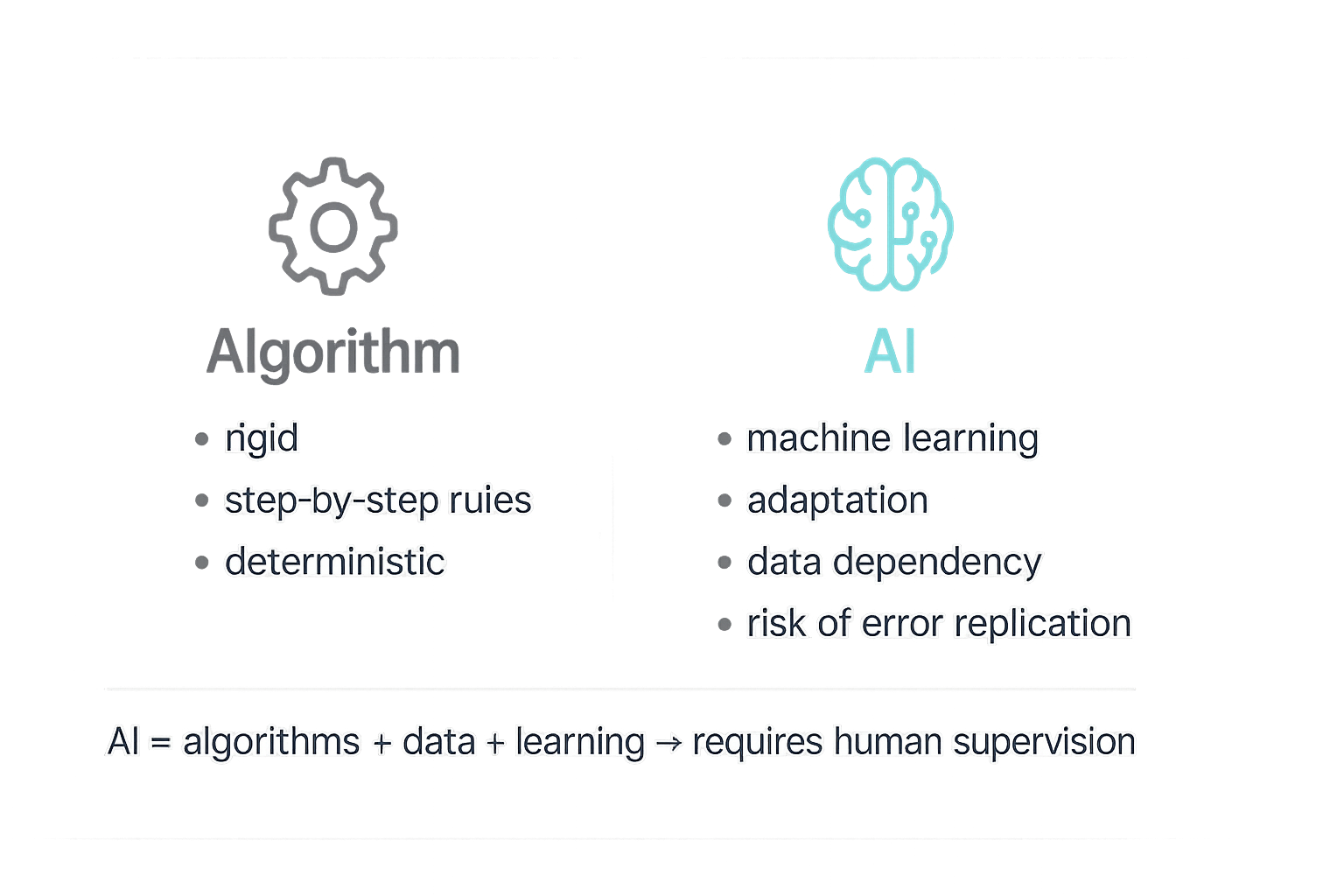
Video automation has become a hot topic — on one hand AI tools can now process hours of footage, suggest cuts, generate captions and adapt formats to platforms in minutes; on the other hand there are concerns about editors' jobs and the quality of produced content. It's worth distinguishing two things: algorithms are sets of rules performing specific tasks, while artificial intelligence is a layer that uses algorithms plus data and machine learning to adapt and predict user behavior. This contrast is well described in industry analyses (e.g. reports and articles: Aproco, OOH Magazine, Monika Kołodziejczyk).
In practice AI speeds up repetitive tasks (transcriptions, cut recommendations, formatting for social platforms), but does not replace context, narrative sensitivity or ethical oversight — as critical voices and risk analyses remind us (Dymek, Holistic.News). Therefore the question "will it kill editors?" should be considered more broadly: what will change in specialists' roles, and what can be automated without loss of quality?
In this article we will answer practically: which tools are worth considering, how to apply automation in video marketing, what the impact on job roles will be, which risks to take into account and what recommendations Lumi Zone gives. I will present concrete examples of automation, case studies from implementations and a decision checklist — so you can immediately assess where automation will bring the biggest time savings and improve the efficiency of your activities. Read on — I promise practical tips, not theoretical musings.
How tools for automatic video creation and editing work — overview of technologies and applications in marketing
In practice, modern tools for creating and editing video combine several AI technologies and classic algorithms to automate repetitive tasks and speed up content production. Below you'll find an overview of the most important capabilities, concrete examples of applications in marketing, and a description of a typical workflow you can implement in a small company with the help of Lumi Zone.
What modern video solutions can do
- Scene and asset generation: automatic creation of short clips using stock footage, synthetic shots, or generative video (based on text or a script).
- Automatic subtitles and transcription: speech recognition and subtitle synchronization in multiple languages, useful for SEO and accessibility.
- Speech synthesis (TTS): naturally sounding voiceovers to quickly turn a script into narration without studio recordings.
- Automatic color and audio correction: exposure balancing, white balance, noise reduction, and audio level normalization.
- Script-based editing: editing clips according to a prepared script — cuts, transitions, inserts and captions generated automatically.
- Automatic cropping and formatting: adapting shots to different formats (16:9, 9:16, 1:1) while preserving key frame elements.
- Content repurposing: splitting long materials (webinars, podcasts) into short, social-media-optimized clips.
- Automated publishing and scheduling: integration with social platforms, scheduling posts and automatically delivering different formats at specified times.
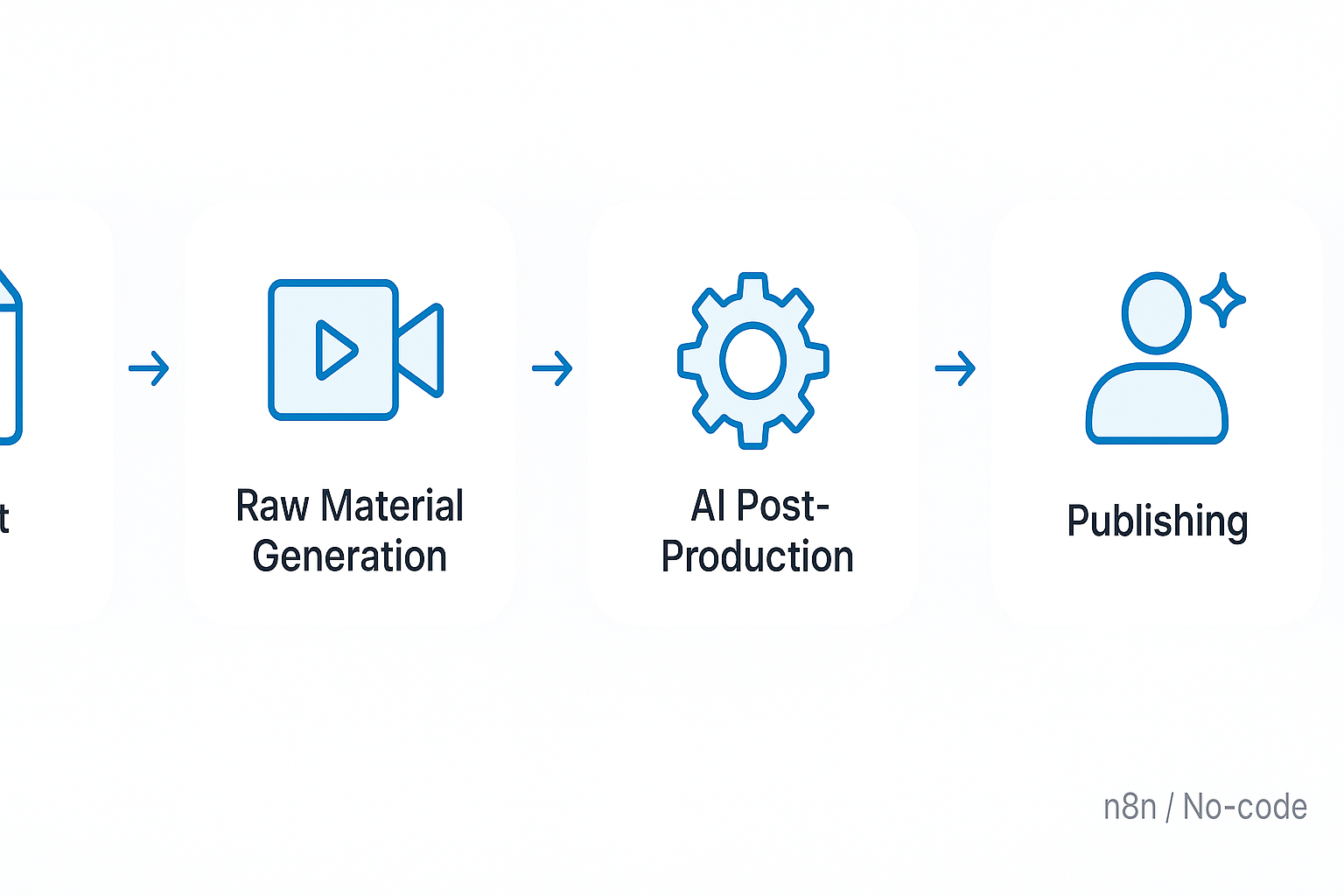
Example automated marketing workflow (step by step)
- Brief: the client fills out a simple form with the campaign goal, target audience and tone of voice.
- Script: the tool generates a draft script based on the brief; a copywriter or the client approves or edits it.
- Asset generation: the system fetches stock footage, creates TTS for narration and/or generates AI video based on the description.
- Automatic editing: the AI editor assembles shots according to the script, adds captions, color and audio correction, and versions for social formats (9:16, 16:9, 1:1).
- Quality control: an operator or marketer checks the draft version, making manual adjustments where creative refinement is required.
- Scheduled publication: the automation tool schedules posts, uploads materials to platforms and monitors results.
This pipeline can be built from off-the-shelf tools: AI editors, repurposing tools, TTS systems and publishing platforms. Lumi Zone connects them into a coherent pipeline using API integrations, webhooks and low-code/no-code platforms (e.g. n8n), so the entire process runs automatically and securely.
Benefits and technical limitations
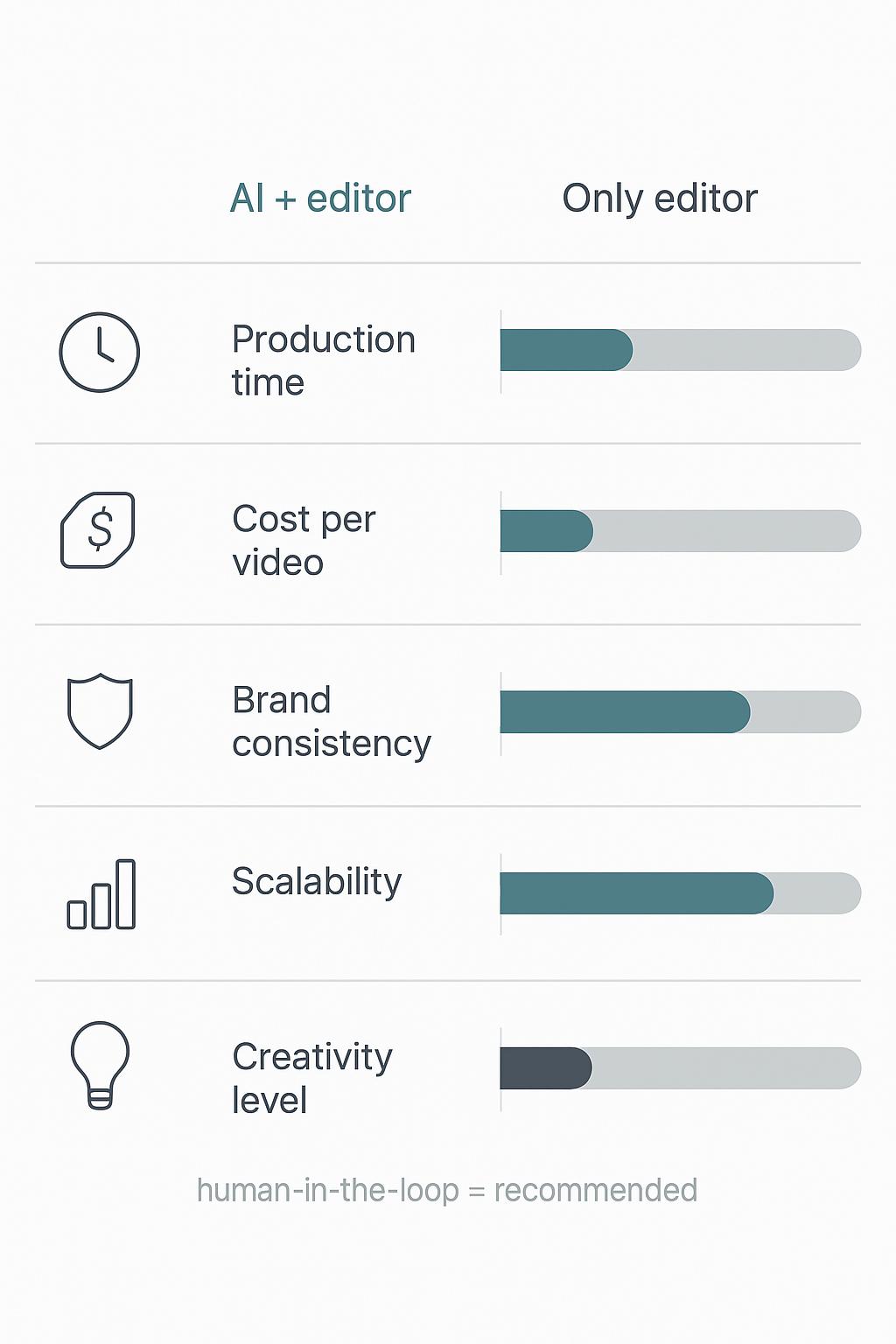
- Advantages: significant time savings, easy production scaling, brand consistency thanks to templates and automatic settings, cost savings for repeatable productions.
- Limitations: AI may make contextual errors (transcriptions, shot matching), creative quality sometimes requires human refinement, there are legal challenges (copyright to source materials, use of synthetic voices) and the risk of repeating the same content patterns.
Therefore at Lumi Zone we combine automation with human oversight — quality audits, manual corrections where you care about originality, and clear rules for licensing materials. If you want to add links to specific tools, we suggest checking the manufacturers' documentation (please add links in the editorial stage).
Move on, where we will show a graphical illustration of the flow (flowchart) of this process — the visualization will help you plan automation in your company.
5. Impact of video automation on the video editor profession and future roles
In short: automation and AI are transforming the work of editors, but the effect is more evolution than elimination of the profession. Routine, repetitive tasks will be automated — we will gain efficiency and scalability. The creative and supervisory human contribution will remain key: artistic concept, emotional crafting of the narrative and quality control are areas difficult to fully replace by machines.
Arguments "for" and "against"
- For: automation increases efficiency — faster rendering of versions, automatic audio synchronization, generating cut-downs for different platforms. It allows teams to focus on ideas and quality.
- Against: AI does not understand cultural context or emotional nuances like a human; it may replicate errors or stereotypes contained in training data, therefore it requires human oversight and audits (more about the risk of repeating errors: Aproco).
What is most likely to be automated
- Audio/video synchronization and cleaning of audio tracks.
- Basic editing – initial rough cuts, selection of shots according to metrics (sharpness, exposure, face detection).
- Creating format variants: vertical, square, 16:9; short teasers and versions for social media.
- Automatic subtitles, transcriptions and translations based on ASR/MT models.
- Simple color corrections and batch export of settings (presets for series of materials).
What will remain the domain of humans
- Artistic concept and storytelling — choice of rhythm, dramaturgy and emotional intent.
- Assessment of cultural context and ethical moderation of content.
- Quality oversight, final color grading and subtle tweaks that require an "eye for detail".
- Interaction with the client and translating the brief into visual outcomes.
Skills a video editor should develop
- Managing pipelines with AI components: configuration, validation and monitoring of automated processes.
- Advanced color grading and audio mastering — tasks less susceptible to automation.
- Storytelling and dramaturgy — the ability to design multi-channel narratives.
- Quality assurance (QA): testing AI outputs, conducting data audits and correcting errors generated by models.
- Basics of prompting and working with AI tools: quickly creating versions, iterations and experiments.
New roles emerging due to automation
- Pipeline operator — someone who manages the workflow between automation tools.
- AI-assisted editing specialist — an editor focused on creative supervision and corrections of AI outputs.
- Content quality auditor — checks compliance with the brief, context and ethical standards.
Practical tips for managers and collaboration models (human + AI)
- Introduce a hybrid work model: AI creates initial versions and prepares materials, the human approves and refines the final cut.
- Create QA and audit processes: creative checklists, contextual tests and regular reviews of AI outputs.
- Invest in training and upskilling the team: technical skills + creative workshops.
- Define SLAs and control points in the pipeline — where AI acts autonomously and where human approval is required.
- Consider mixed roles (e.g., junior editor + AI operator) — it's a cost-effective staffing model.
If you want to implement such solutions in your company, Lumi Zone helps design AI pipelines, train the team and implement quality audit processes — so automation increases productivity rather than the risk of repeating mistakes.
Conclusion, implementation recommendations and CTA from Lumi Zone
Short answer to the title question: no — AI will not kill editors, but it will change the way they work. Video content automation shifts the burden from routine, repetitive tasks to creative and decision-making tasks. Editors who can work with AI tools and use automated pipelines will become more productive and valuable to marketing and production teams.
Here is a practical implementation plan that we recommend at Lumi Zone — fast, realistic and focused on measurable results:
- Video process audit – we will identify the steps that generate the largest time costs and errors (e.g. transcription, color grading, rendering). Outcome: a process map and a proposal of KPIs.
- Tool selection – we will match low-code/no-code solutions and AI modules to your needs (editors, personalization tools, transcriptions). Priority: integration with existing systems.
- Automated pipeline pilot – we run a prototype (e.g. an automated flow in n8n) for a single video format to verify the assumed KPIs at small scale.
- Training and team upskilling – we train video editors and content managers to work with AI tools and in human-in-the-loop practices.
- Production deployment and KPI monitoring – full rollout with automation of publishing and reporting, plus ongoing supervision and optimization.
Examples of measurable benefits we observe with Lumi Zone clients:
- Editing time savings: typically 30–70% in preparatory stages (transcription, rough cut, exports).
- Increase in number of published formats: 2–5x more short versions and personalized variants thanks to automated pipelines.
- Better content personalization: an increase in CTR and engagement of 15–40% when applying segmentation and automatic content matching.
- Faster reporting: automatic dashboards and reports save teams 10–30 work hours per month.
Lumi Zone services that will help you achieve this: low-code/no-code integrations, building and optimizing pipelines in n8n, automation of publishing and reporting, pilot deployments, and ongoing human-in-the-loop supervision. Our approach combines technology with practice – we automate what is repetitive and leave strategic decisions to people.
Want to see how it works in your company? We offer a technology audit and a pilot after which you will receive a concrete ROI plan. Schedule a short consultation — we will prepare an implementation and pilot proposal tailored to your goals. Additional materials and supporting studies can be found in our sources: Aproco, OOH Magazine, Dymek, Monika Kołodziejczyk, Holistic.news.
If you want to quickly test the benefits of video content automation — schedule a short consultation. Together we'll design a pilot that will show real savings and new publishing opportunities.