Prompt Engineering: How to Write Effective Commands for AI

Introduction — purpose of the article and why Prompt Engineering matters
This article will show how to write prompts that actually work — simply, practically, and with a focus on marketing and social media automation. We'll focus on examples, templates, and immediately useful solutions.
What is Prompt Engineering?
Prompt Engineering is the skill of formulating precise instructions for AI models so they generate expected, coherent, and easy-to-use content. It's not a trick — it's a method: choosing words, context, and constraints that enable AI to operate predictably and repeatably.
3 key benefits for companies
- Greater content precision: a well-constructed prompt yields texts and graphics better aligned with brand tone and campaign goals, reducing the need for revisions.
- Repeatability of results: repeatable prompts allow scaling the content creation process — the same settings produce consistent results across campaigns.
- Time and cost savings: automating repetitive tasks (creating descriptions, scheduling posts, initial moderation) shortens team workload and allows focus on strategy.
AI in social media supports personalization, customer service automation, moderation, and performance analysis, but it also brings risks — algorithmic bias, privacy issues, and moderation errors (more on the dangers: Ocoya, OOH Magazine).
In the rest of the article you will find: concrete rules for creating prompts, ready-made templates for use in marketing and social media, step-by-step examples, and tips on how to implement these solutions in Lumi Zone using low-code/no-code tools to achieve fast and secure results.
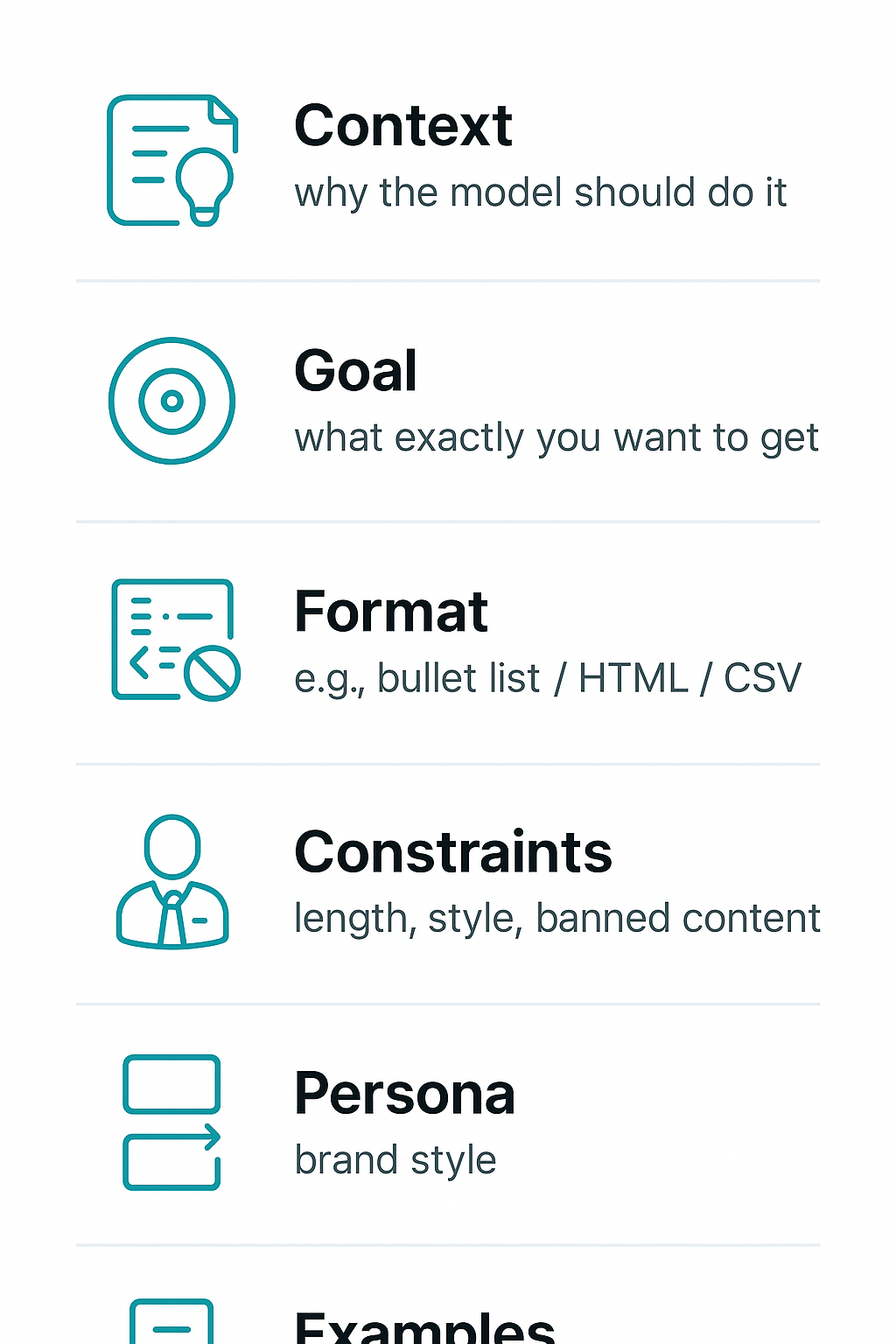
3. Principles and best practices of Prompt Engineering
A well-designed prompt is not accidental — it's a composition of several clear elements. Below I explain each of them and show practical rules that will make your commands really work.
- Context — provide the background: who the audience is, where the information comes from, what data we already have. Context helps the model choose the tone and scope of the response.
- Goal — start with the outcome: write exactly what you want to get (e.g. "short engaging post, 100–120 characters, call to action"). This is the most important rule: specify the outcome before the format.
- Format — response structure: bulleted list, paragraph, headings, length, emoji, etc. This saves you time on editing.
- Constraints — rules and prohibitions: tone (formal/informal), words to avoid, character limit, legal or branding requirements.
- Persona — who “speaks” for the text: industry expert, friendly brand manager, technical specialist. Persona gives character and consistency to the communication.
- Examples / input samples — show a template of the expected answer. Models learn better from examples than from abstract instructions.
Rule: start with the outcome and provide examples
Start by stating the result you want to achieve, then specify the format and include 1–3 examples of the target response. This shortens iterations and increases the accuracy of the output.
Iteration: test → analyze → refine
The process should look like this: first you run the prompt, then you analyze the results for accuracy, style, and errors, and then you refine the instruction. Repeat until the metrics reach an acceptable level. Lumi Zone helps automate this loop of testing and monitoring.
Language style and avoiding ambiguity
- Use short, unambiguous sentences.
- Avoid ambiguous words and jargon unless necessary.
- If you want creativity — specify the range (“more creativity” vs “strict facts”).
How to measure a prompt's success
- Content quality: relevance, coherence, conformity with tone (manual evaluation or semantic metrics).
- Consistency: stability of results across multiple runs.
- Execution time and cost: generation speed and resource consumption.
- User metrics: CTR, engagement, number of editorial corrections.
Remember human oversight: AI speeds up work but can replicate biases or errors — supervision and auditing are key (see AI risk analyses: Ocoya, Springer).
Examples: imprecise → improved
- Facebook post
Imprecise: “Write a post about a promotion.”
Improved: “Write an engaging Facebook post (100–120 characters) about a 20% discount on courses, tone: friendly, with CTA ‘Book now’. Use emoji.” - Product description
Imprecise: “Describe the product.”
Improved: “Create a 3-sentence description of a sports watch: emphasize water resistance, 7-day battery life, targeted at amateur runners, tone: motivating.” - Email follow‑up
Nieprecyzyjny: „Write a follow‑up.”
Poprawiony: „Prepare a short follow‑up email after the webinar (70–100 words), remind the key points and invite to a demo. Tone: professional, warm.”
Do you want your prompts to work on the first run? Lumi Zone helps create templates, test and measure results — get in touch and we will implement a process based on proven practices and human oversight.
4. Ready prompt frameworks and templates
Below you will find 8 practical, ready-to-paste prompt templates — prepared specifically for marketing activities and social media. Each includes a title, a ready prompt with placeholders to replace, a tip on when to use it and the expected response format. You can use them as-is or adapt them to a specific tool — and if you want, Lumi Zone will automate their integration into your workflow.
1. Expert-style post — LinkedIn
- Prompt: "Write a LinkedIn post on the topic: {TEMAT}. Audience: {AUDIENCE}. Include 3 key takeaways, a short practical example and a call to discussion. Tone: professional, authoritative. Avoid technical jargon."
- When to use: When you want to build authority and engage professional contacts.
- Expected format: 3 takeaways + 1 short example, tone: professional, 120–150 words.
- Tuning tip: For lighter models shorten to 2 takeaways; for more powerful models add a request for a statistic or quote.
2. Engaging post — Facebook
- Prompt: "Create an engaging Facebook post for {AUDIENCE}. Topic: {TEMAT}. Start with a question, add 2 emotive points and finish with a CTA encouraging comments. Style: friendly, encouraging."
- When to use: Engagement-boosting campaigns or collecting community feedback.
- Expected format: 1 opening question + 2 points + CTA, tone: friendly, 50–90 words.
- Tuning tip: Lighter models: replace emotive points with short sentences. Stronger models: ask for A/B variants.
3. Tweet / short post
- Prompt: "Write a short post (up to 280 characters) on the topic: {TEMAT}. It should be concise, with the hashtag {HASHTAG} and the CTA 'Learn more'."
- When to use: Quick messages, news, a teaser for an article.
- Expected format: 1 sentence, tone: concise/energetic, max 280 characters.
- Tuning tip: For smaller models add a specific example; for more advanced models ask for 3 variants.
4. E‑commerce product description
- Prompt: "Write a product description: {PRODUCT_NAME}. List 3 key features: {FEATURES}. Target audience: {AUDIENCE}. Finish with a short social proof (1 sentence) and a CTA 'Buy now'."
- When to use: When creating product pages in an online store.
- Expected format: 3 features + social proof, tone: sales-oriented, 80–120 words.
- Tuning tip: Weaker models: ask for a simple bullet list; stronger ones: ask for A/B (longer and shorter description).
5. Newsletter — opening section (follow-up)
- Prompt: "Write an introduction to a follow-up newsletter for people who downloaded {LEAD_MAGNET}. Goal: remind them and encourage the next step. Tone: helpful, non-intrusive. Includes 1 special offer."
- When to use: After lead magnets or webinars to maintain conversion.
- Expected format: 2–3 short paragraphs, tone: supportive, 70–120 words.
- Tuning tip: For models with limited memory shorten to 1 paragraph; for larger models ask for email subject line variants.
6. 1-week content plan
- Prompt: "Create a 7-day content plan for {BRANŻA} aimed at {AUDIENCE}. Include the post type (LinkedIn/Facebook/Email), the topic and a short sentence describing the CTA."
- When to use: Quick scheduling of the week's publishing.
- Expected format: List of 7 items, each: platform | topic | CTA. Tone: practical.
- Tuning tip: For stronger models add a request for suggested publication times and hashtags.
7. Brief for the designer (prompt for a graphic tool)
- Prompt: "Generate a visualization: {KONCEPT}. Dimensions: {WIDTH}x{HEIGHT}. Style: {STYL} (e.g. minimalist, neon). Mandatory elements: logo {LOGO_URL}, text: '{SHORT_TEXT}'."
- When to use: When automatically creating graphic variants for campaigns.
- Expected format: Short 5-point specification, tone: precise.
- Tuning tip: Weaker models: simpler descriptions; stronger ones: detailed moodboards and color palettes.
8. Prompt for comment moderation (rules and responses)
- Prompt: "Create a set of rules and 6 ready-made responses for comment moderation for the brand {BRAND}. Rules: detection of hate speech, spam, product inquiries. Responses: empathetic, informative, escalation."
- When to use: Automated moderation with human oversight — reduces handling time and risk of errors.
- Expected format: Rules (list) + 6 template responses, tone: empathetic/professional.
Ethical note and privacy: always avoid placing sensitive or personal data in prompts without consent. Models can reproduce biases from training data — use human oversight for moderation and critical communications. If you want, Lumi Zone will build a pipeline that automates templates while maintaining quality control and GDPR compliance.
5. Common pitfalls, prompt debugging and A/B tests
In practice the most common errors when creating prompts are: imprecise context, overly broad instructions, lack of format constraints and excessive expectations about facts. These pitfalls lead to ambiguous, long or incorrect responses — especially when the model tries to "guess" missing information.
Most common mistakes and their consequences
- Imprecise context: lack of information about the audience, purpose or tone causes generic, unhelpful outputs.
- Too broad instructions: "Write about marketing" → very varied results; you'll lose repeatability.
- No constraints: without specifying length, format or data structures the model generates texts that are difficult to process automatically.
- Excessive expectations regarding facts: models may hallucinate facts – it's better to require citations or indicate uncertainty.
Methods for diagnosis and improvement
- Logging variants of prompts and results (prompt version, model parameters, response) — fundamental for analysis.
- Control of seeds/temperature and other parameters (temperature, top_p) — affect the randomness and diversity of responses.
- Comparing results across multiple models or versions — allows you to spot systematic errors.
- A/B tests with metrics: accuracy, format compliance (format pass rate), consistency and response time.
Debugging checklist
- Reduce the prompt to the minimal example that reproduces the error.
- Add an example of the expected response (one-shot / few-shot).
- Enforce the output format (e.g., JSON, CSV) and validate the structure.
- Review model settings: temperature (randomness), max_tokens (length), top_p (distribution).
- A/B tests: run variants in parallel, collect metrics and choose the winner based on KPIs.
3 short debugging examples
Example 1 — Before: Describe the product.
After: Describe product X for a small business owner (tone: trustworthy, 3 paragraphs). Provide 3 benefits and a CTA.
Example 2 — Before: Create a list of emails.
After: Generate 5 versions of a sales email (100–150 words), subject line, 2 CTA variants, JSON format.
Example 3 — Before: Summarize the report.
After: Summarize the report in 4 points: key findings, recommendations, risks. Respond as a numbered list.
Prompt testing automation in n8n and low-code platforms
In practice you can automate tests without coding: build a workflow that sends a set of prompt variants to the API, saves responses to Google Sheets or a database (logs), runs format validation (e.g., JSON schema) and calculates metrics (pass rate, length, semantic consistency). In n8n you'll use HTTP/Webhook blocks, nodes for saving (Sheets/DB) and simple functions/conditions for comparisons. Schedule tests, run A/B tests in parallel and set alerts when metrics drop. Lumi Zone often uses n8n as a central workflow for prompt testing and deployments — check the n8n documentation and other no-code/low-code tools to tailor the solution to your needs.
Would you like us to prepare an automated set of prompt tests tailored to your case? Lumi Zone can build the workflow, define metrics and deploy monitoring so your prompts operate predictably and scalably.
Useful materials: n8n documentation, no-code platform guides and articles about AI automation (e.g., sources on AI in social media). We can help review and implement them.
6. Case study: social media automation for a small fashion brand
Imagine a local fashion brand selling clothes online and running a physical store. The business goal is simple: increase audience engagement and relieve the marketing team, saving time — e.g., 8–12 hours of work per week that are currently spent on manually creating posts and scheduling.
1) Business goal
- Increase engagement (likes, comments, CTR) by approximately 15–30% within 3 months.
- Save 8–12 hours per week of the marketing team's work.
- Maintain a consistent brand voice and enable faster scaling of campaigns.
2) Automation flow (step by step)
- Collecting the brief — a Google/Typeform form gathers the topic, tone, target audience and product information.
- Post generation — an NLP tool creates text suggestions (caption + CTA) based on the brief.
- Image creation — an image generator (controlled prompt) prepares visual variants consistent with the brand identity.
- Publication scheduling — n8n orchestrates sending to publishing tools (Meta, Instagram, TikTok scheduler) and sets the best times.
- Monitoring and feedback — the system collects metrics, and results go to a dashboard; based on them, improvements are automatically suggested.
3) Example prompts used in the flow
- Post text: "Write 3 short captions (max 140 characters) promoting the new summer collection, tone: friendly, trendy, with CTA 'check now'."
- Variation for the target: "Adjust captions for the 20–30 age group interested in eco-friendly fashion."
- Graphics: "Create a 1:1 moodboard with pastels, a model outdoors, flatlay style, minimal text, color palette: #F6EDE1, #C9ADA7."
- Scheduling (n8n): "Publish the post at 18:00 on Wednesdays and Saturdays; notify the Slack team with the link."
4) Specifically — results
- Time savings: 8–12 hours/week thanks to automation of creation and publishing.
- Language consistency: automatic application of the prepared brand tone in every post.
- Scalability: rapid creation of more campaign variants without hiring additional staff.
5) Risks and how Lumi Zone addresses them
- Bias and partiality: we apply content validation and quality checklists; a human approves the final versions.
- Data privacy: we design flows compliant with GDPR — we minimize stored data and encrypt integrations.
- Automated moderation and contextual errors: we combine algorithms with moderator oversight and an escalation process.
- Loss of authenticity: training prompts on the brand tone and regular quality audits preserve the company's natural voice.
How Lumi Zone can help: we offer a prompt audit and full automation implementation (n8n + content generators), along with team training and quality control procedures. Contact us and we will prepare a concrete plan for time savings and increased engagement for your brand.
7. Summary and call to action (CTA)
Investing in prompt engineering today is not a luxury but a practical advantage: better, faster, and more predictable AI results translate directly into time savings and greater team efficiency. The key practices we discussed are: clear and contextual command formulation, specifying the expected response format, using examples, and iterative testing and validation. For companies, this means faster content creation, more accurate marketing automations, and lower risk of publication errors.
Below is a practical checklist you can apply immediately to evaluate your own prompts:
- 1. Does the prompt include context (who, for whom, what goal)?
- 2. Is the expected response format clearly specified (e.g., list, heading, length)?
- 3. Are examples of acceptable and unacceptable responses provided?
- 4. Are constraints and quality criteria applied (tone, style, sources)?
- 5. Has the prompt been tested in several variants and were the comparison results recorded?
- 6. Have safety mechanisms been considered: bias filtering, data protection, human review?
Remember ethics and human oversight: AI can speed up work, but it requires control to avoid biases, privacy violations, and incorrect content moderation. Want to check your prompts or see how automation can work for you? Contact Lumi Zone to receive a free mini-consultation / prompt audit or to schedule an automation demo — we will analyze, improve, and implement solutions that will genuinely streamline your work.
Recommended resources: