AI in comment management – support or threat?

AI in handling comments and private messages — help or risk?
Why this topic matters
More and more companies use artificial intelligence to reply on social media — both to public comments under posts and to private messages (DMs). It's not just Facebook or Instagram, but also LinkedIn, Twitter/X and chat systems on websites. In practice AI can take over the first line of contact, filter inquiries, provide quick responses and route more complex issues to the team.
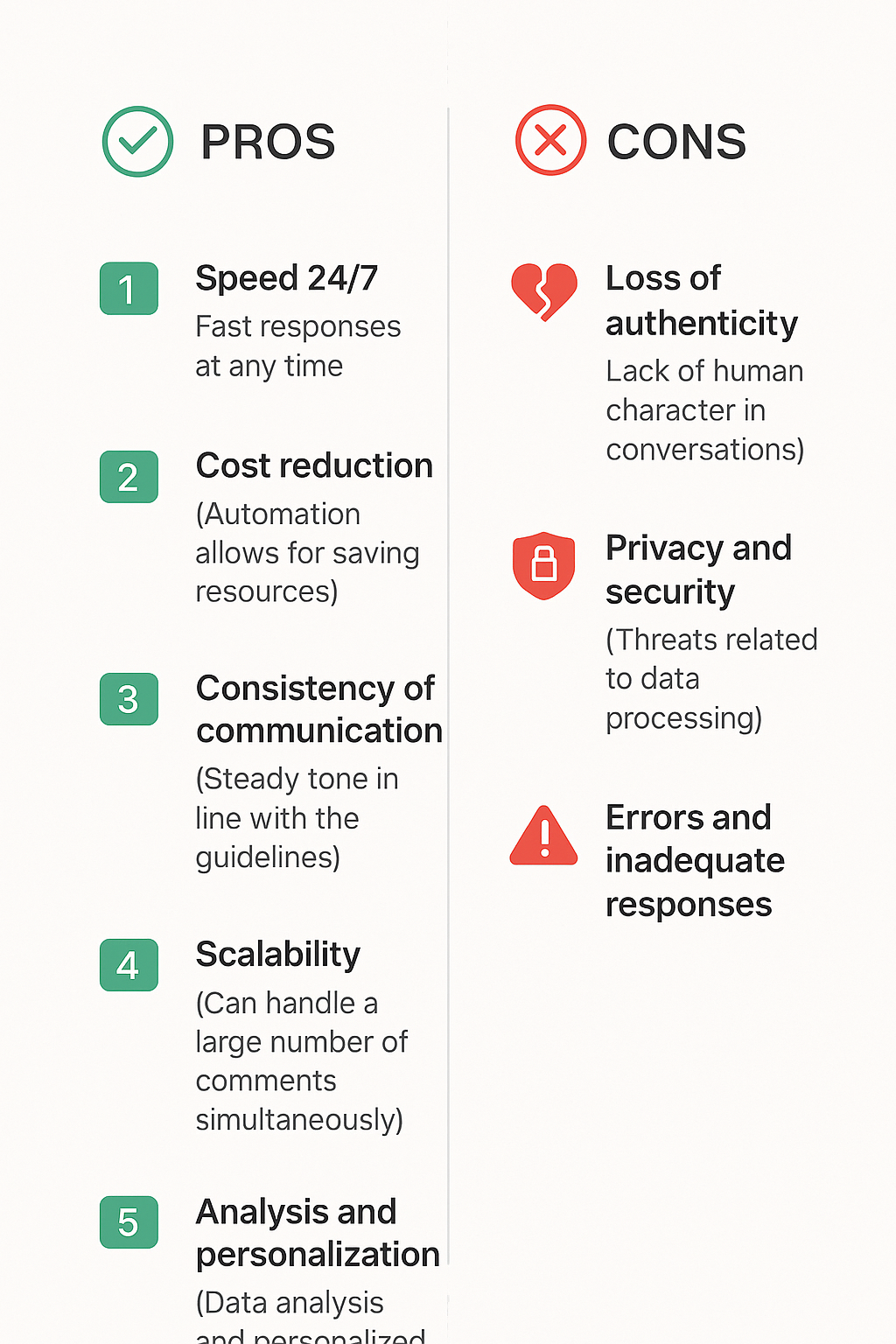
The main benefits are immediately apparent: faster response times, 24/7 availability, consistency of communication and a scale of service that a human alone cannot handle. On the other hand, real risks emerge — loss of conversational authenticity, the risk of incorrect or inappropriate replies, concerns about data privacy, and potential mistakes leading to reputational consequences. Therefore, the decision to implement AI in communication is not merely a technical choice but a strategic step with consequences for the brand and customer relationships.
As Lumi Zone we help companies implement low-code/no-code solutions and automation systems (including n8n) that combine the power of AI with human oversight — so automation truly saves time rather than worrying customers. Read on — below I'll explain the concrete pros and cons, how to maintain a balance between automation and humans, and how to practically implement a solution without risk to the brand.
What you'll learn next
- The exact benefits of using AI in handling comments and DMs (speed, savings, data analysis).
- The main risks and pitfalls (authenticity, privacy, errors, disinformation).
- Practical rules for balancing: hybrid models, human supervision, transparency with users.
- A simple step-by-step implementation plan — from testing to monitoring and adjustments.
Sources and further reading
- Artificial intelligence in social media — MoreBananas
- Pros and cons of using AI for text creation — Marketize
- Pros & Cons of AI in Social Media — Blink Tech
- Pros and cons of content generation by AI — Internet Plus
- Risks related to AI — Marcin Kordowski
3. Detailed discussion of the benefits of using AI in handling comments and messages
Introducing AI to the handling of comments and private messages is not just a trend — it brings concrete benefits that translate into time savings, lower operating costs, and better customer experiences. Below I describe practical advantages and typical use cases, along with examples, a simple workflow diagram, and metrics worth measuring.
Speed and 24/7 availability
AI responds almost instantly, allowing the user to receive a reply outside the team's working hours. Typical uses:
- automated FAQ responses — immediate information on hours, delivery, order status;
- acknowledgements of message receipt and estimated response time — reduce user frustration;
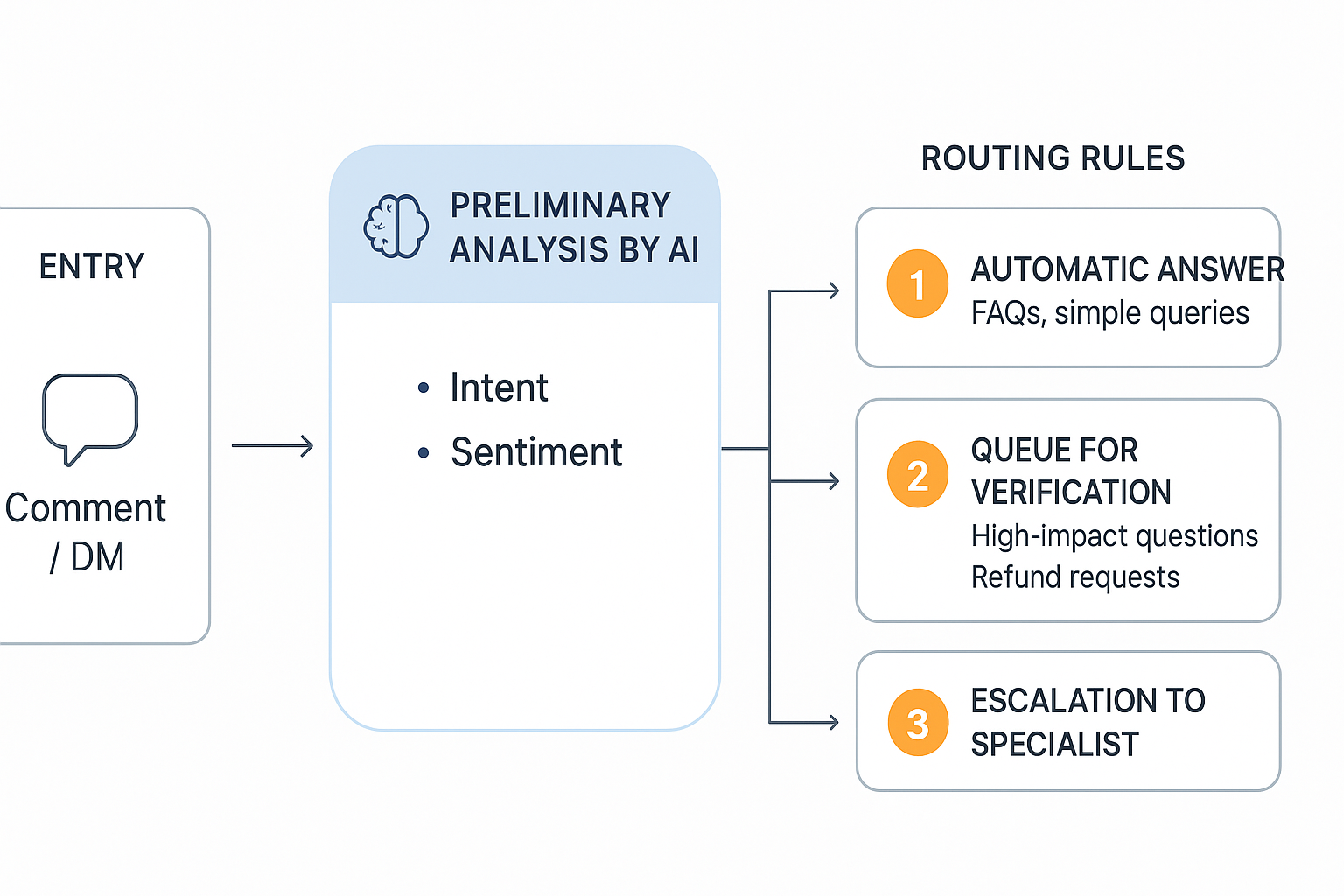
- routing to the appropriate teams — AI analyzes intent and forwards the request to support, sales, or the technical department.
Example: an automatic reply confirming receipt of a request within 5–10 seconds after sending the message. In practice, such action reduces perceived waiting time and increases customer trust.
Cost reduction and scalability
Automation allows handling hundreds or even thousands of messages without a proportional increase in staffing. Instead of building large teams for peak seasons, an AI solution will handle most routine inquiries, and humans will deal only with exceptional cases.
Financial effect: lower HR costs, shorter onboarding, faster ticket processing. At Lumi Zone we design solutions that scale support with minimal fixed costs.
Consistency and control of brand tone
AI uses a repository of responses and stylistic guidelines (style guide), ensuring communication is consistent across all channels. This is important in marketing campaigns and customer service, where unwanted tone differences can harm the brand image.
- response patterns — defined templates for the most common inquiries;
- response bank — an updated collection of ready phrases and CTAs;
- style guide — rules regarding language, response length, and level of formality.
Analysis and personalization
AI analyzes message content, customer history, and behavior, which allows user segmentation and personalized responses or product recommendations. Examples of use:
- segmentation based on intent (e.g., complaint vs. product inquiry) and offering appropriate promotions;
- product recommendations during the conversation — cross-sell and up-sell in a natural way;
- automatic reminders and follow-ups tailored to user behavior.
As a result, average cart value and conversion rates increase without manually engaging the sales team.
Integrations and automated processes — practical technical examples
Modern low-code/no-code tools make it easier to connect systems. As an example I'll show n8n — a popular tool for building workflows without code:
- n8n connects the APIs of social platforms (Facebook, Instagram, Twitter) to CRMs (e.g., Pipedrive), external webhooks and email-sending tools (e.g., MailerLite);
- example simple workflow (code-free):
- Trigger: new message/comment on social media
- → AI analysis: intent detection, sentiment, data extraction (e.g., order number)
- → Template reply: sending an automatic, personalized message
- → Escalation: for complex issues a ticket is created in the CRM and a notification is sent to a human
- → Follow-up: automatic email sequence after the ticket is resolved
Such connections reduce manual work and ensure a smooth flow of information between tools.
Sample Polish response templates (short)
- Order status inquiry: „Thank you for your message! I'm checking the status of your order — I'll get back to you within 15 minutes. If you provide the order number, you'll speed up the process.”
- Question about opening hours: „Hi! We are available Monday to Friday from 9:00–17:00. Outside these hours you can leave a message — we will reply as soon as possible.”
- Complaint: „We're sorry about this situation. Please provide the order number and a brief sentence about what happened — we'll create a ticket and our specialist will contact you.”
- Request to contact a human: „I understand — I'm connecting you now to a consultant. Please wait a moment.”
KPIs worth measuring
- average first response time (First Response Time);
- % of automatically resolved tickets (Auto-Resolved Rate);
- CSAT (Customer Satisfaction) after an interaction;
- overall time to close a ticket (Time to Resolution);
- rate of escalation to a human (Escalation Rate).
Do you want to implement a secure, well-designed AI solution in social media management? At Lumi Zone we design hybrid systems that combine the speed of AI and the empathy of people — with integrations, among others, through n8n and practical integration schemes with CRM and email tools. Additional materials and inspirations can also be found in the articles: MoreBananas, Marketize and analyses by Blink-Tech.
5. Detailed discussion of drawbacks and risks — how to limit them in practice
Implementing AI to handle comments and private messages brings measurable benefits, but also real risks. Below I describe the most important risks and specific, practical steps you can implement today to minimize them. Each point contains operational, technical and organizational recommendations — so that your communication remains fast, while also safe and authentic.
1. Loss of authenticity — how to measure the 'human' quality of communication
Automated replies can sound flat and reduce engagement. Metrics worth using: CSAT (Customer Satisfaction), NPS (Net Promoter Score) and quality-of-response analysis (QA scoring, manual sampling).
- Implement periodic CSAT surveys after key interactions — automatic reports in n8n or Zapier.
- QA system: random sampling of 1–2% of responses weekly, assessment by moderators using a 5-point scale (accuracy, tone, usefulness, factual errors, empathy).
- Compare response time with CSAT and NPS — if rapid responses lower satisfaction, consider increasing human involvement in handling.
- Implement a hybrid workflow: AI handles FAQs, and escalation to a human occurs on trigger phrases (phrase list: 'complaint', 'lawyer', 'security', 'non-compliance' etc.).
2. Privacy and data security (RODO/GDPR)
Processing messages requires compliance with RODO. Key principles: data minimization, anonymization, limited retention periods, access control.
- Data minimization policy: record only the fields that are necessary to resolve the case; anonymize or delete the rest after the conversation ends.
- Log anonymization: before using logs to train models, remove identifiers (name, e-mail, numbers) or tokenize them.
- Log storage: establish a retention policy (e.g., 90 days of active logs, 2 years of anonymized archive) and document it in the DPIA (Data Protection Impact Assessment).
- Encryption and access: use AWS KMS / Vault, role-based access control (RBAC) and access audits; log every administrative action.
- Consent and disclosure: inform the user that part of the conversation may be handled by AI and that data may be used to improve services (optionally with an opt-out).
3. AI errors and the risk of generating harmful content
AI makes mistakes — from inaccuracies to offensive content. Detection mechanisms, fallbacks, and manual moderation are important.
- Real-time monitoring: logging all responses, metadata, and trust scores. Tools: ELK stack, Datadog, Sentry.
- Fallbacks: if the model has a low confidence score or detects a trigger (e.g., „suicide”, „threat”), automatically escalate to a human and suspend publication.
- Hybrid moderation: a moderation queue for high-risk content, weekly reviews and reevaluation of problematic cases.
- Red-team and stress tests: simulate attacks, provocations, and unusual queries before deploying to production.
4. Misinformation and bias
The model may unknowingly reproduce prejudices or spread incorrect information. Data audits and continuous testing are needed.
- A/B tests: compare AI responses with human control for accuracy and reliability; monitor false-positive and false-negative metrics.
- Model audits: creating „model cards” and regular external audits (e.g., WhyLabs, Evidently AI, Fiddler).
- Source control: limit the use of unverified sources; implement fact-checking mechanisms before publication.
- Corrective procedures: if you detect bias, stop the model, analyze the training set and implement fixes and retraining with balanced data.
5. Reputational costs and crisis situations
An AI error can quickly become a media crisis. Prepare scenarios and response procedures.
- Scenarios: incorrect medical/legal advice, offensive response, data leak — each scenario should have a checklist of actions (isolation, disabling automation, notifying the legal team, public communication).
- Crisis procedure: immediate halt of automated responses, log analysis, informing users and public apologies describing remedial steps.
- Quarterly crisis simulations involving PR, legal, and IT teams.
6. Ethical aspects and transparency
Users have the right to know who they are talking to. Transparency builds trust.
- Transparency: always inform when a response comes from AI; publish the AI usage policy on the site (what is stored, for how long, how to file a complaint).
- Options: provide the ability to talk to a human and an opt-out from using content to train models.
- Regular reports: publish quarterly reports on errors, escalations, and remediation steps.
- Model re-evaluation process: schedule (e.g., every 3 months), list of tests and metrics for approval.
Practical implementation of these principles requires tools and processes — from n8n for flow automation, through ELK/Grafana for monitoring, to PagerDuty and Slack for crisis alerts. At Lumi Zone we help design secure, hybrid solutions: from GDPR policies, through logging and escalation architecture, to model audits and crisis procedures — so that AI supports your brand, not endangers it.
7. Practical implementation guide and Lumi Zone offer
Do you want to implement AI for handling comments and private messages but don't know where to start? Below you'll find a ready, step-by-step implementation plan and the Lumi Zone offer — a partner who will guide you through every stage: from audit to managed service. The whole thing is written in plain language, with concrete timelines, resources, and KPIs.
1. Roadmap (implementation phases)
- Phase 0 – Audit of current communication
Time: 1–2 weeks. Resources: 1 Lumi Zone consultant (analysis), access to social channels and CRM. Outcome: map of typical inquiries, SLA level, main pain points. - Phase 1 – Selection of cases for automation
Time: 1 week. Resources: 1 product owner + 1 customer service specialist. Outcome: list of priorities (e.g., FAQ, complaints, simple requests for information). - Phase 2 – Pilot (1 channel)
Time: 6–8 weeks. Resources: pilot team (1–2 moderators, 1 n8n engineer, 1 AI trainer). Outcome: working workflow, database of ready responses, KPI report. - Phase 3 – Iteration and expansion
Time: 4–6 weeks per additional channel. Resources: growth of technical and operational team. Outcome: model optimization and expanded escalation rules. - Phase 4 – Full deployment and maintenance
Time: ongoing maintenance (Service Level Agreement). Resources: managed Lumi Zone service (monitoring, quality audits, expansion of the response bank).
2. Example pilot plan (6–8 weeks)
Goal: to deploy automatic replies for one channel (e.g., Facebook Messenger or Instagram DM) and achieve safe KPIs.
- Week 0–1: Kick-off, content audit, selection of 50 most frequent inquiries. Setting KPIs and SLAs.
- Week 2: n8n configuration, webhook integration, CRM connection. End-to-end tests.
- Week 3–4: Deployment of the LLM model and template set; launch in "assistant" mode (suggestions for the operator).
- Week 5: Transition part of the communication to automation (goal: 40–60% automated responses). Collecting qualitative data.
- Week 6–8: Optimizations, team feedback, full pilot report and recommendations for expansion.
Pilot KPIs (example goals):
- Average time to first response: ≤ 15 minutes (during working hours) / ≤ 60 minutes 24/7.
- Automation rate: 50% of inquiries handled automatically (without human intervention).
- CSAT (customer satisfaction score): ≥ 4.2/5 for interactions handled automatically.
- Escalation rate to a human: < 10% of inquiries.
3. Proposed technology stack (low-code / no-code)
- Orchestration: n8n — connects webhooks, processing, CRM integrations, and monitoring.
- LLM / Chatbot: dedicated API models (e.g., cloud LLMs), or off-the-shelf chatbots with fine-tuning options.
- CRM: integration (HubSpot, Pipedrive, in-house system) – recording conversation history and sales triggers.
- Monitoring and logging: Elastic Stack / Datadog / simple log in CRM + KPI dashboard.
- Security: encryption layer, PII anonymization policy, access audit.
Example simple integration flow:
Webhook (social) -> n8n (transformation) -> LLM (response generation) -> CRM (conversation logging) -> Log/Monitoring4. How to measure ROI and which costs to consider
ROI is affected by team time savings, increased conversion, and improved CSAT. Costs and items you should take into account:
- Tool costs: LLM subscriptions, n8n (hosting), CRM.
- Implementation cost: analysis, configuration, creating the response bank (one-time).
- Maintenance costs: monitoring, model updates, quality audits.
- Cost of human escalation: operators' hourly rate, training.
Example success metrics:
- FTE savings: total hours saved / FTE (e.g., 0.5 FTE = real marginal cost).
- Increase in conversion from DM responses: +X% (before/after comparison).
- Reduction in AHT (Average Handle Time): e.g., from 10 min to 4 min.
- Improvement in CSAT and NPS.
Sample simple ROI formula: (Annual savings + additional revenue) / (implementation costs + annual maintenance costs).
5. Team training and escalation procedures
- Training 1 (2 days): tool operation, monitoring AI suggestions, using the response bank.
- Training 2 (1 day): communication ethics, privacy policy, recognizing inquiries that require escalation.
6. Ready-to-download materials
To speed up implementation, we have prepared ready-to-download materials. Place them on the site as lead magnets:
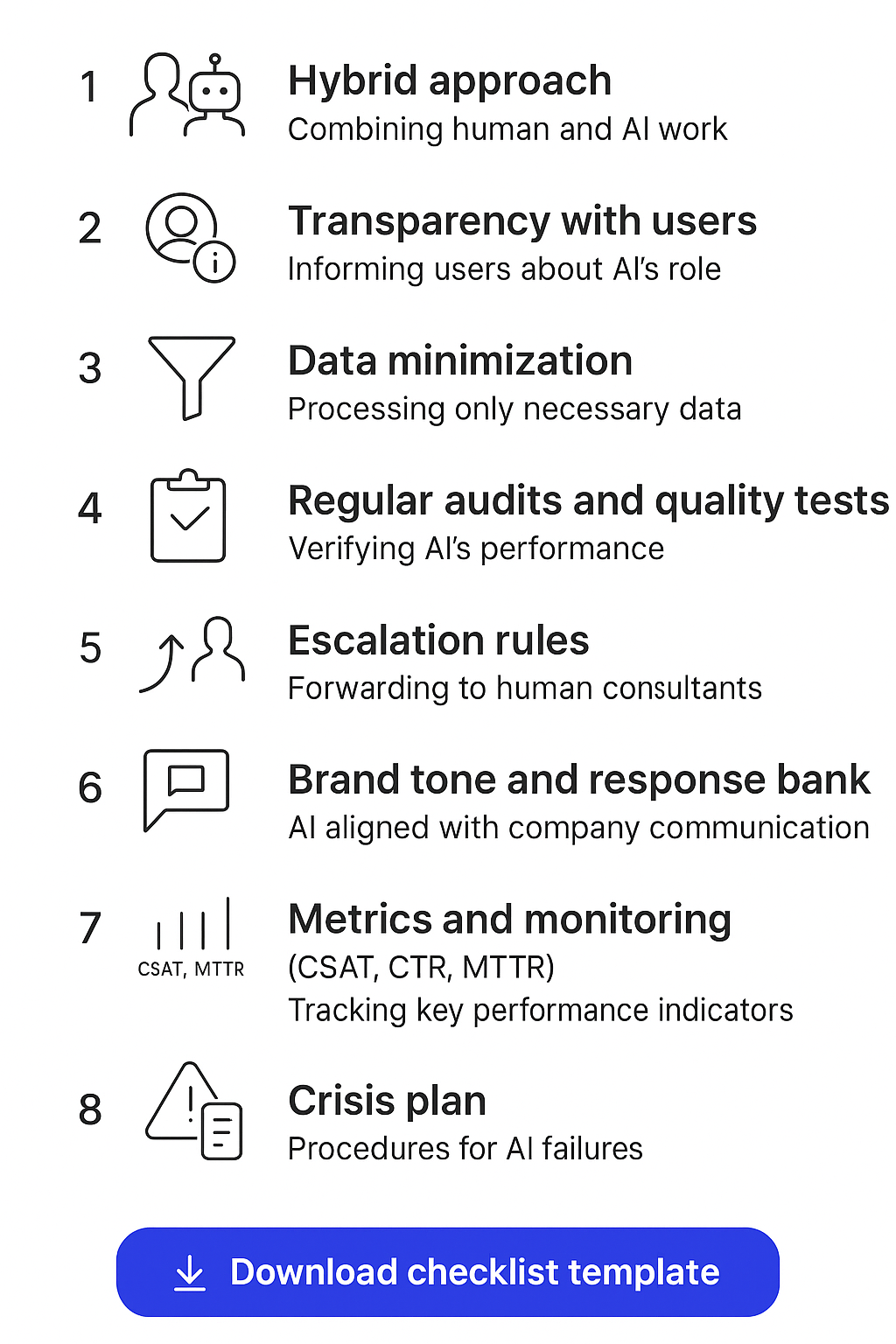
- AI implementation checklist for message handling
- Response templates and escalation playbook
- Communication privacy policy template
We suggest requesting an email address in exchange for the download to start offering consultations and a pilot.
7. How Lumi Zone can help
Lumi Zone offers support at every stage of implementation — as your technical and operational partner. Our services:
- Communication audit: analysis of inquiries, identification of cases for automation.
- Pilot project: running a 6–8 week pilot, configuring n8n and LLM, measuring KPIs.
- Integrations: connecting social → n8n → CRM → monitoring; low-code/no-code implementations.
- Creating a response bank: drafting consistent, empathetic templates + escalation procedures.
- Managed service: 24/7 monitoring, quality audits, KPI reports and continuous optimization.
Want to see how it looks in practice? Download our checklist and schedule a free consultation/pilot audit. During a 30-minute conversation we will analyze your needs, point out quick wins (quick wins) and prepare a recommended action plan.