Is AI already writing your emails and you don't know it?
Introduction
“Are your emails already being written by AI and you don't know it?” — this question sounds provocative, but it is increasingly becoming a reality. Automation of communication and content generation by machines is not a futuristic vision, but a tool that many companies already use, often without full awareness of the consequences. In this article we will show how to recognize such solutions, what benefits they offer, and what risks they carry.
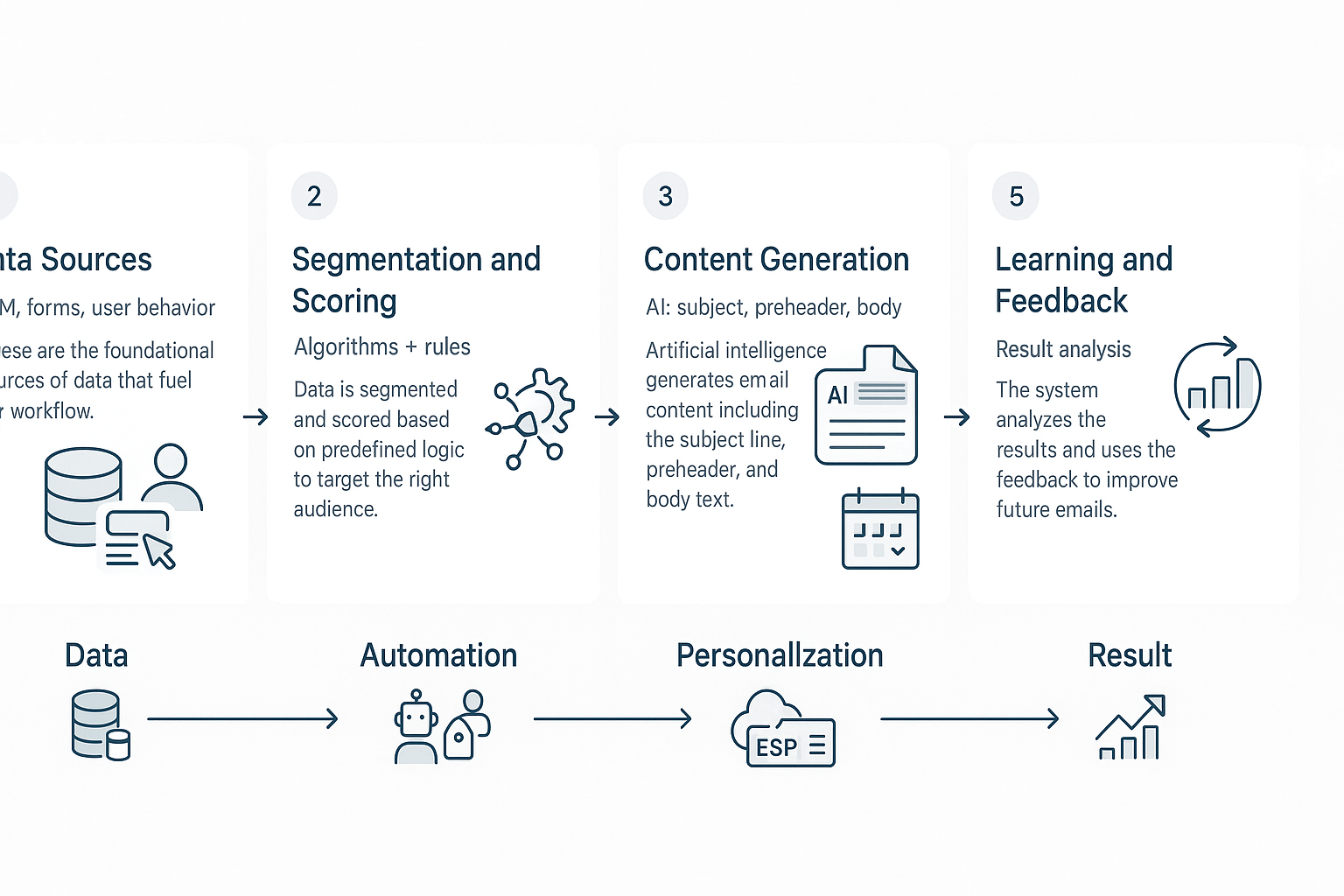
Briefly about the difference: algorithms are a set of rules and instructions — sorting, filtering or simple decision rules. Artificial intelligence is a layer on top of that: models that learn from data and can predict, personalize and generate content adaptively. In practice they often work together — classic algorithms select, and AI optimizes and personalizes messages. This mechanism is well described in articles about AI's impact on communication and social media, e.g. on MoreBananas and OOH Magazine (MoreBananas, OOH Magazine).
Why is this important for email marketing? Because today personalization and optimization determine opens, click-throughs and conversions. Automation allows sending the right content at the right time to the right recipients — which in practice translates into better campaign results and time savings. Industry observations indicate that the share of tools automating communication is growing at double-digit rates year over year, and organizations that implement them gain a competitive advantage thanks to faster iterations and better personalization.
In the next part of the article you'll find an overview of tools (from simple algorithms to AI solutions), practical use cases, instructions on how to detect and audit mailing automation, and a list of risks and ready implementation steps. As Lumi Zone, we specialize in automating business processes — from low-code/no-code solutions and n8n to full marketing and mailing automations — and we'll show how to use these technologies safely and effectively.
3. Overview of tools and categories of solutions for email automation
If you're wondering which tool to choose — this overview will give you a practical catalog of options and decision criteria. Below you'll find four main categories as well as tools, their applications, benefits and limitations. At the end of each part I give a short business example so you can immediately see how it might work for you.
1) ESPs with AI features (Email Service Providers)
ESPs with built-in AI features offer subject‑line optimization, send‑time optimization, and dynamic content. This is the first step toward automation without major changes to the stack.
- Examples: Mailchimp (AI subject lines), SendGrid (deliverability + send‑time), Klaviyo (behavior‑based segmentation).
- Use cases: automatic testing of message subjects and selecting the sending time for specific recipient groups.
- Benefits: faster improvement of open rates and CTR, easy implementation, less manual work.
- Limitations: less control over content‑generation logic, risk of over‑optimization (e.g., "safe" subject lines that lose brand character).
- Business example: A SaaS company launches an onboarding sequence with optimized subject lines and optimal send times, increasing user activation.
2) LLM-based content generators
Large Language Models (LLMs) speed up the creation of dynamic email versions, A/B variants, and personalized product sections.
- Examples: OpenAI GPT, Anthropic, local fine‑tuned solutions (e.g., chatGPT‑like in the client's cloud).
- Use cases: generating content for multiple segments, automatic A/B variants, quickly responding to customer inquiries.
- Benefits: very fast copy production, easy creation of multiple versions, time savings for the marketing team.
- Limitations: need for quality control, risk of generating inaccurate or brand‑inconsistent content; requires editorial oversight.
- Business example: An e‑commerce business generates 10 variants of promotion descriptions and tests which convert better in email campaigns.
3) Orchestrators and integrators (n8n, Zapier, Make)
These platforms connect CRM, AI and ESP, enabling building complex flows without code or with minimal coding.
- Examples: n8n (self‑hosted, flexible), Zapier (simple and fast), Make (visual automations).
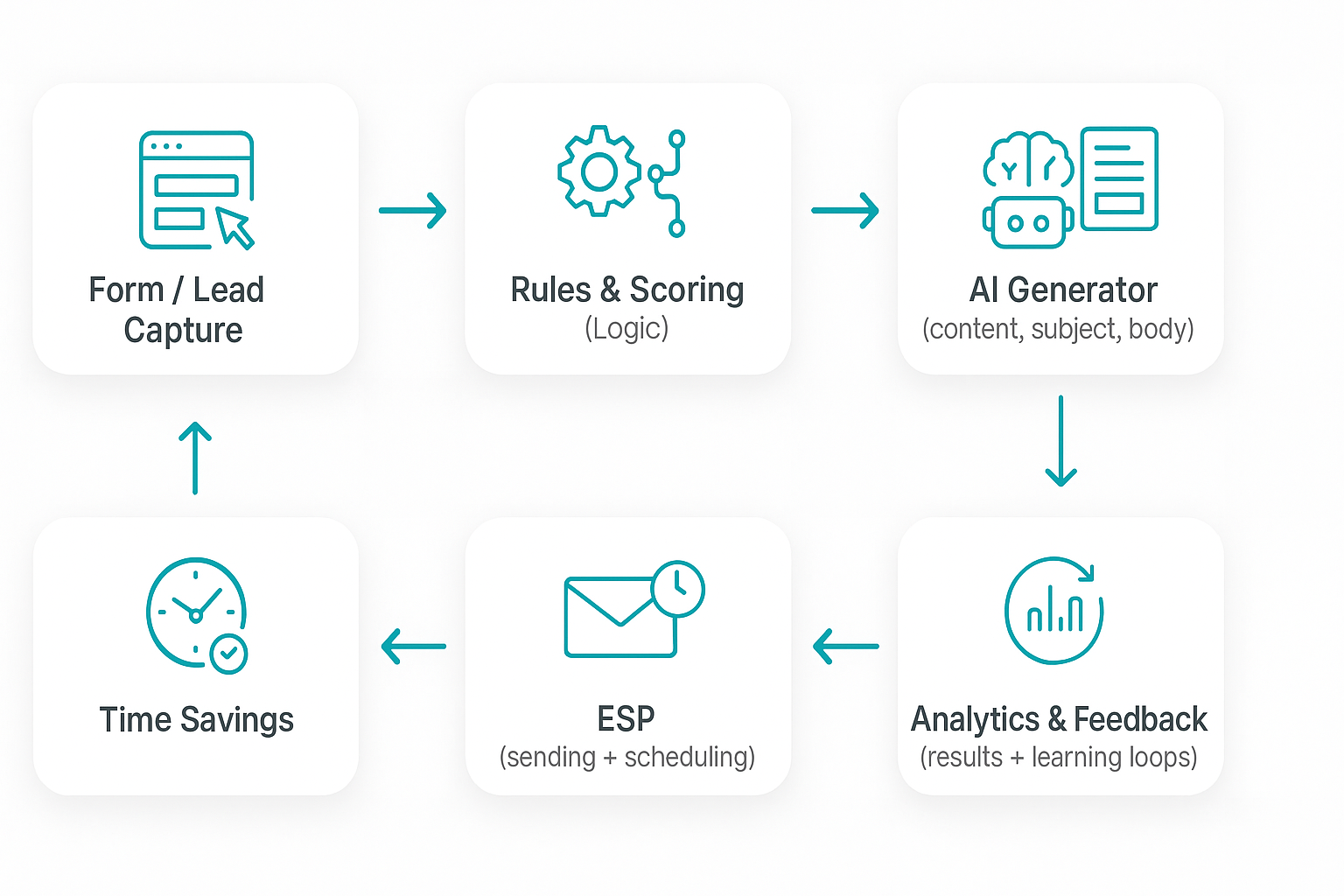
- Use cases: data synchronization from CRM → LLM call → sending via ESP; automatic list updates and scoring.
- Benefits: centralization of logic, easy expansion, connecting multiple data sources (forms, shops, support).
- Limitations: complex flows may require technical consultation; integration costs at high volumes.
- Business example: n8n orchestrates onboarding: CRM detects a new customer, LLM creates a personalized email, ESP sends it at the optimal time.
4) Toolset for personalization and analytics
In this category you will find tools for behavioral scoring, product recommendations and behavior analysis — essential for effective personalization.
- Examples: Segment (user data), Bloomreach / DynamicYield (recommendations), Hotjar / Mixpanel (behavior analysis).
- Applications: 360° profiles, automatic recommendation rules, behavior scoring for email triggers.
- Benefits: higher offer relevance, better content matching, increased sales and engagement.
- Limitations: requires data and good modeling, incorrect signals can lead to off-target recommendations.
- Business example: an online store sends dynamic recommendations based on recently viewed products, increasing cart value.
5) Tools for compliance and data protection (GDPR)
Compliance with GDPR and secure data storage are fundamental. Without them, automation can do more harm than good.
- Examples: OneTrust (consent management), Vanta (security audit), tools for data encryption and retention.
- Applications: consent management, automatic data deletion on request, audit of data flows between tools.
- Benefits: minimization of legal risk, customer trust, better security practices.
- Limitations: additional costs and processes to implement, possible functionality restrictions under strict data policies.
- Business example: a B2C company implements cookie consent and automatic deletion of customer data on request, maintaining the legality of email campaigns.
When choosing, consider the scale of the business, access to data and the need for control over content. If you want, Lumi Zone can conduct a stack analysis and design a solution combining CRM, AI and ESP — so that personalization is based on sound behavior analysis (more about the role of algorithms and AI in personalization can be found here and here).
4. How to detect if your emails are generated by AI — audit checklist and metrics to monitor
Below you will find a practical, step-by-step audit that will allow you to verify the level of automation and the quality of your email communication. Maintain a control routine — even a good tool can "trigger" the wrong templates or overly personalized fragments that harm the outcome.
1) Symptoms of "AI writing" — quick checklist
- Repetitive phrases and expressions across different messages (the same openings, "Hi {Name}!" without further context).
- Inconsistent tone: a formal header, then a too-colloquial body.
- Excessive, artificial personalization (e.g., references to actions the user did not perform).
- Perfect grammar but "flat" or vague content without specifics.
- Uniform CTAs across multiple campaigns, low creativity in offers.
- Sending patterns: messages sent at unusual times or with very regular frequency, as if from a machine.
2) KPIs and metrics to check
- Open rate — sudden spikes or drops within the same audience group may suggest mass testing.
- CTR (click-through rate) — low CTR despite an acceptable open rate = a problem with content consistency.
- Conversion rate — a basic metric to determine whether personalization leads to business results.
- Unsubscribe rate and spam complaints — an increase indicates poor tone/content fit.
- Time on site after click and bounce rate — assess whether clicks lead to genuine interest.
- Reply rate and forwards — authentic, valuable emails more often generate replies and shares.
3) Technical audit methods
- Review headers (headers): check
Message-ID,X-Mailer, traces of sending systems, List-Unsubscribe — they identify used ESPs/automation. - Analysis of link parameters (utm_campaign, uid, campaign_id) — do UID patterns indicate mass variant generators?
- Comparing content variants: collect a sample of 30–50 emails and analyze n-grams, recurring phrases, and differences between A/B.
- Check DKIM/SPF/DMARC configurations and sending servers — security and source of sending.
4) Risk assessment
- GDPR and privacy: automation based on profiling requires a clear legal basis and transparent consent — lacking this is a legal risk.
- Filter bubbles: excessive personalization can trap the recipient in a "bubble" of content, as described, among others, in reports about the impact of algorithms on user preferences (MarketingOnline).
- Risk of disinformation and loss of authenticity — AI can generate incorrect data, and repetitive, "impersonal" messages destroy trust (MoreBananas).
5) Quick Lumi Zone audit — what it includes and how it helps
- Integration review: ESP, CRM, CMS and data flows — identification of automation sources and potential risks.
- Content quality test: analysis of a sample of 50 messages in terms of tone, consistency and genuine personalization.
- Review of KPIs for the last 90 days and interpretation of deviations (open, CTR, conversion, complaints).
- Technical scan of headers and link parameters, check of DKIM/SPF/DMARC.
- Report with recommendations: remediation priorities, A/B test proposals and quick fixes for implementation.
- Optional implementation of fixes: low-code/no-code automations, improved segmentation, team training.
If you want — Lumi Zone will carry out such an audit within 5 working days, delivering a clear report and action plan. Contact us and together we'll restore human quality to your communication while maintaining the efficiency of automation.
Conclusion — what to do now and how to start working with Lumi Zone
If you are not yet using AI in emailing, you are losing time and potential revenue. Automation lets you save hours of work preparing campaigns, increase conversion through better personalization and A/B tests, and maintain communication consistency as the number of recipients grows. Research and practice show that combining algorithms and AI solutions significantly improves the effectiveness of marketing activities — it's worth looking at this as an investment in scalability and better sales results (you can read more about the role of AI in marketing on, among others: MoreBananas, MarketingOnline).
In practice we implement projects using low-code/no-code tools — e.g. n8n — which allows quickly building secure, flexible workflows connecting CRM, ESP and content-generating tools. This way you get a solution tailored to real needs that is easy to scale.
5-step implementation plan for small businesses
- Audit — review of existing processes, data and tools; identification of the quickest opportunities for automation.
- Pilot with one workflow — we'll configure one key task (e.g. a welcome funnel, reactivation of inactive users) in n8n and connect ESP/CRM.
- Iteration and optimization — we analyze results, test variants of content and segmentation, and improve personalization rules.
- Scaling — we expand automations to additional campaigns and channels, adding further integrations.
- Maintenance and monitoring — ongoing observation of KPIs, regular updates and team training.
Lumi Zone service package proposals
- Initial audit — process map, list of quick wins and priorities; concrete technical and business recommendations.
- Pilot implementation with n8n — designing and launching a workflow, integration with ESP/CRM, basic automation of content generation.
- Integrations with ESP and CRM — connecting systems (e.g., Mailer, HubSpot, ActiveCampaign), data synchronization and automation of contact flows.
- Maintenance + training — monitoring, monthly reports, updates, and training the team on operating and further developing the automation.
FAQ — short answers to the most common questions
- How long does the pilot last?
- A typical pilot takes 2–6 weeks — faster if data and system access are ready. During the first two weeks we deliver a working prototype.
- What data are needed?
- A contact list (with basic fields), campaign history (results, opens, clicks), access to ESP/CRM, and sample email templates. Lumi Zone helps with data preparation and validation.
- How do you handle GDPR?
- Security and compliance are a priority: we minimize collected data, work based on consents and data processing agreements, apply pseudonymization where needed, and assist in data protection impact assessments. If necessary, we cooperate with a data protection lawyer.
Want to see what results automation will bring to your business? Book a free 30-minute pilot audit with Lumi Zone — during the call we'll define the scope of the pilot, goals, and expected ROI. Write to us: hello@lumizone.pl or visit the Lumi Zone website and schedule a call. We start with specifics — you gain time, we deliver a working solution.